When the TV says "No signal" or the picture breaks into blocks, the fault could be in any one of ten places between the antenna on the roof and the tuner inside the TV. Some of them you can check from the lounge room in a minute. Others are on the roof, where nobody should go without the right equipment. Our new TV antenna repair checker sorts one from the other: answer up to five quick questions and it gives you a 10-point checklist of your antenna system, with each part marked as ruled out, worth checking or the likely fault.
It is free, it takes under a minute, and you don't need to know anything about antennas to use it. The questions are about what you can see: what the picture is doing, which TVs are affected and when.
How the checker works
The first two questions are the same for everyone: what's wrong with the picture (no signal, breaking up, or some channels missing), and whether it's every TV in the house or just one or some. That second answer decides where the fault can be. If every TV is affected, it is almost always somewhere before the signal is split between rooms. If only one TV is affected, the roof is almost certainly fine and the problem is near that TV.
From there the checker asks two or three more questions, depending on the path:
- Every TV affected: when it's worst (all the time, in wind or rain, at certain times of day, or since some work on the house), whether the booster power pack behind one of your TVs has its light on, and roughly how old the antenna is.
- One or some TVs affected: whether a TV that works elsewhere in the house also works on the same wall point, and roughly how old the affected TV is.
That is four or five taps in total. There is a Back button if you change your mind, and your browser's back button steps back through the questions too.
Reading your checklist
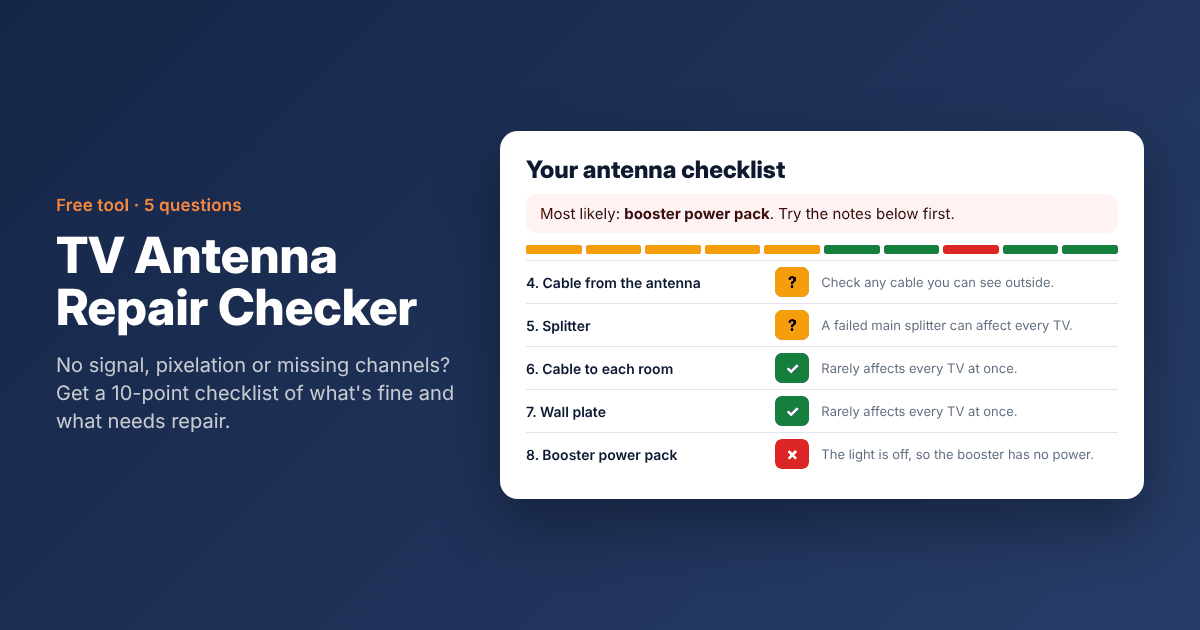
The result is a checklist of the ten parts of a home antenna system, in order from the roof to the TV:
- Antenna
- Mount or mast
- Booster (masthead amplifier)
- Cable from the antenna
- Splitter
- Cable to each room
- Wall plate
- Booster power pack
- Lead from the wall to the TV
- TV and tuning
Each part gets one of three marks, with a short comment explaining why:
- ✓ Ruled out or OK. Your answers show this part isn't the problem. For example, a loose wall plate can't make every TV in the house lose signal at once.
- ? Check this. It could be involved but your answers can't tell either way. The comment says what to look for.
- ✗ Likely fault. Your answers point here. The line at the top of the checklist names it, and says whether it's something to try yourself first or a job for a technician.
Items 1 to 6 are on the roof, in the roof space or inside the walls. If one of those is marked ✗, the checker tells you it needs a technician. Items 7 to 10 are at the TV end of the system, where there is usually something safe to try first.
Three examples
No signal on every TV, and the power pack light is off
If you have a booster, it gets its power up the antenna cable from a small plug pack behind one of your TVs. When that pack is unplugged, switched off at the wall or has failed, every TV in the house loses signal at the same moment. The checker marks the power pack as the likely fault, rules out the wall plates, room cables, leads and TVs, and tells you to check it is plugged in and switched on, or to try another power point. If the light still won't come on, the pack or the booster needs replacing. See this checklist.
Every TV breaks up, but only at certain times of day
A picture that is fine in the morning and breaks up in the evening usually isn't the antenna wearing out. The most common cause is interference from 4G and 5G mobile towers, which are busiest at those times, or a booster turned up so high that it overloads the TVs. The checker marks the booster as the likely fault and explains both causes. That is a technician job: the fix is usually a filter or setting the booster correctly. See this checklist.
One TV breaks up, but another TV works on the same wall point
This is the most useful test you can do yourself. Carry a TV that works into the problem room and plug it into the same wall point. If it works there, the signal reaching that wall point is fine, so everything from the roof to the wall plate is ruled out and the problem is in the original TV. The checker marks the TV itself as the likely fault and suggests a re-tune, checking it's on the TV or Antenna input, and trying a different lead. If the TV is over ten years old, it notes that its tuner may be failing. See this checklist.
What to do with the result
Start with anything marked ✗ that is near the TV: the power pack, the wall plate, the lead or the TV's tuning. Our retune guides cover every major TV brand. If a roof item is marked ✗, or the safe checks don't fix it, book a repair.
The Copy checklist button copies your answers, all ten marks and their comments, plus a link back to your result. Paste it into our booking form or an email and the technician knows what you've already checked before they arrive. Your answers are kept in the page address, so you can also bookmark the result or send the link to someone else in the house.
What it can't tell you
The checker works from what you can see, not from a measurement. It narrows down where to look; it can't measure the signal at your wall plate, find water inside a connector or tell a weak signal from a reflected one. Only a technician with a signal meter can confirm the fault. It is also built for houses and small residential systems: apartment blocks with a shared MATV system and Foxtel satellite setups have extra equipment and need a technician to diagnose.
And sometimes it isn't your system at all. If one network vanishes from every TV at the same moment and the others are fine, the transmitter may be off air. Check your suburb on the reception map to see which transmitter serves you, and look at the broadcaster's own site for outage notices.
For more detail on the two most common symptoms, read our guides to fixing "No signal" on your TV and why your TV is pixelating.
Try the TV antenna repair checker. Already know you need a technician? Get a Free Onsite Quote.